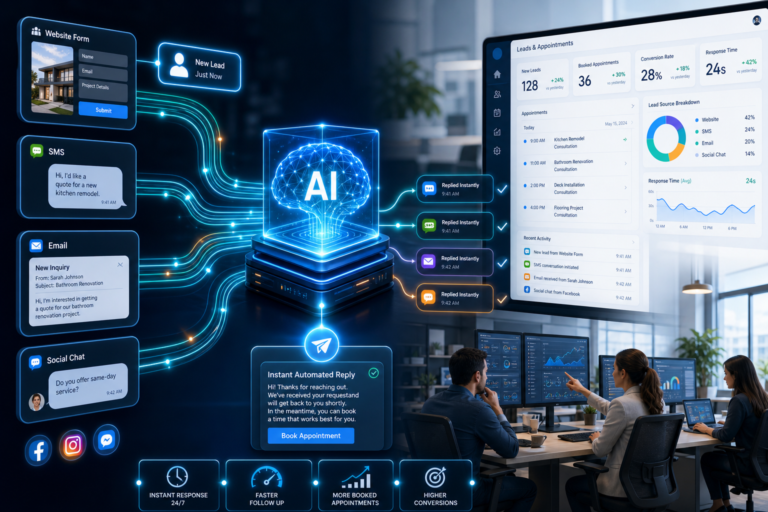

AI lead response automation uses intelligent software to instantly detect, analyze, and respond to new inquiries without manual intervention. The system triggers automated replies the moment a lead submits a form, sends a message, or initiates contact through any digital channel. This removes response delays, keeps prospects engaged during peak interest moments, and improves conversion efficiency by ensuring every inquiry receives immediate attention. Service businesses using automated lead response systems can reply within seconds instead of hours, which directly impacts how many leads turn into booked appointments and closed deals.
Speed matters more than most businesses realize. Research shows that responding to a lead within five minutes makes you 100 times more likely to connect compared to waiting 30 minutes. AI lead response automation eliminates the gap between inquiry and reply, giving your business a competitive edge in markets where prospects contact multiple providers simultaneously. The system works around the clock, handling inquiries during nights, weekends, and holidays when your team is unavailable.
What Is AI Lead Response Automation
AI lead response automation is a technology system that detects new lead inquiries and automatically sends personalized replies based on predefined rules, behavioral data, and conversation context. The automation monitors multiple channels, including website forms, SMS messages, social media messages, email inquiries, and chat widgets. When a new lead appears, the system instantly analyzes the inquiry type, contact information, and relevant business context before generating and sending an appropriate response.
This goes beyond simple auto-replies. Modern AI response systems can understand inquiry intent, pull relevant information from your CRM, customize messages based on lead source or service requested, and adjust tone based on conversation stage. The automation continues engaging leads through multi-step workflows, asking qualification questions, providing requested information, and guiding prospects toward booking appointments or taking the next conversion step.
The core difference between basic auto-responders and AI lead response automation is intelligence. Traditional auto-replies send the same generic message to everyone. AI systems adapt responses based on context, previous interactions, lead behavior, and business rules you configure. This creates a more natural conversation experience while maintaining instant response times across all inquiry channels.
How the Technology Works Behind the Scenes
AI lead response automation operates through several integrated technology components working together in real time. The system starts with trigger detection, where monitoring software constantly watches for new lead signals across connected channels. These triggers include form submissions, incoming text messages, chat widget conversations, social media inquiries, and email arrivals. The moment a trigger fires, the automation engine activates the response workflow.
The next component is data processing and context analysis. The system extracts key information from the inquiry including contact details, message content, lead source, service interest, and any custom fields captured during the inquiry process. This data gets matched against your CRM records to check if this is a returning lead or new contact. The system also analyzes message content to understand what the prospect is asking about, which service they need, and what response type will be most helpful.
Once the system understands the inquiry context, the response generation engine creates the reply message. This involves selecting the appropriate message template, personalizing content with the lead’s name and relevant details, adding service-specific information based on what they requested, and formatting the message for the delivery channel being used. The generated response maintains your brand voice while addressing the specific inquiry the prospect submitted.
The final component is delivery and tracking. The system sends the response through the same channel where the inquiry arrived, logs the interaction in your CRM, sets up follow-up triggers if the lead doesn’t respond, and notifies your team about the new lead so they can monitor the conversation. All of this happens within seconds of the initial inquiry, creating the instant response experience that improves conversion rates.
Key Components of an AI Response System
Every effective AI lead response automation platform includes several essential components that work together to create seamless lead engagement.
Trigger Management
The trigger system monitors all connected channels for new lead activity. This includes website form integrations, SMS inbox monitoring, social media messaging APIs, email inbox connections, and chat widget activity tracking. Each trigger type can have custom settings that determine which leads get automated responses and which require manual review before engagement begins.
Response Logic Engine
This component contains the rules and workflows that determine how the system responds to different inquiry types. You configure response paths based on lead source, service requested, time of day, lead score, and custom criteria specific to your business. The logic engine routes inquiries through the appropriate response workflow, ensuring prospects receive relevant information matched to their specific needs.
Message Template Library
Successful automation requires a library of pre-written message templates covering different inquiry scenarios. These templates include initial response messages, qualification questions, service information, pricing guidance, appointment scheduling prompts, and follow-up reminders. Each template supports dynamic personalization fields that automatically insert lead-specific information when messages get sent.
CRM Integration Layer
The integration layer connects your AI lead response automation system with your customer database. This allows the automation to check for existing contact records, pull relevant customer history, update lead records with new interaction data, and maintain synchronized information across your entire sales technology stack. Without proper CRM integration, your automation operates in isolation without access to important context that improves response quality.
Analytics and Reporting Dashboard
The reporting component tracks automation performance including response times, engagement rates, conversion metrics, and workflow effectiveness. This data helps you identify which automated responses generate the best results, where leads drop off in the engagement process, and which inquiry types need response optimization. Regular analysis of these metrics enables continuous improvement of your automated lead engagement strategy.
The Lead Response Automation Workflow
Understanding the complete workflow helps clarify how AI lead response automation creates value for service businesses.
The process begins when a prospect takes action that indicates interest in your services. They might fill out a contact form on your website, send a text message to your business number, reach out through Facebook Messenger, or start a conversation through your website chat widget. This action creates a lead record in your system and triggers the automated response workflow.
Within seconds, the automation system detects the new inquiry and begins processing. It extracts all available information from the lead submission including name, contact details, service interest, lead source, and any custom questions answered during the inquiry process. The system checks your CRM to determine if this prospect has contacted you before or if this is their first interaction with your business.
The response engine then selects the appropriate message template based on the inquiry type and your configured business rules. For example, a roofing inquiry might receive a different initial message than an HVAC service request, even though both came through the same website form. The system personalizes the selected template by inserting the lead’s name, referencing their specific service interest, and including any relevant information that addresses their inquiry.
The personalized message gets delivered through the same channel where the inquiry originated. If the lead submitted a website form that included their phone number, they might receive a text message reply. If they messaged you through Facebook, the response goes back through Facebook Messenger. This channel matching creates a natural conversation experience rather than forcing prospects to switch communication methods.
After sending the initial response, the automation workflow continues with follow-up actions. If the lead responds to your initial message, the system can detect their reply and send additional information, ask qualification questions, or prompt them to book an appointment. If the lead doesn’t respond within a set timeframe, the automation triggers follow-up messages designed to re-engage the prospect and keep your business top of mind.
Throughout this process, your team receives notifications about new leads and can monitor automated conversations through your dashboard. Team members can jump into any conversation to provide manual assistance when needed, ensuring the automation enhances rather than replaces human interaction. The system logs every message exchange, tracks engagement metrics, and updates lead records so your entire team has visibility into the prospect’s journey.
Benefits of Automating Lead Response
Businesses that implement AI lead response automation experience several measurable improvements in their lead conversion process.
Faster Response Times
The most immediate benefit is elimination of response delays. Manual lead follow-up often takes hours or even days, especially when inquiries arrive outside business hours or during busy periods. Automated systems respond within seconds regardless of when leads contact you. This speed advantage is particularly valuable in competitive markets where prospects contact multiple service providers simultaneously. Being the first to respond significantly increases your chances of winning the business.
Improved Lead Engagement
Automated responses keep prospects engaged during their peak interest moment. When someone submits an inquiry, they’re actively thinking about the service they need and evaluating their options. An instant response capitalizes on this high-intent moment, providing information while they’re still focused on solving their problem. Delayed responses allow prospects to lose interest, contact competitors, or simply forget they reached out to your business.
Consistent Communication Quality
Automation ensures every lead receives the same high-quality response regardless of which team member would have handled the inquiry manually. This eliminates the variability that comes with different communication styles, experience levels, and attention to detail across your team. Every prospect gets accurate information, professional messaging, and appropriate next steps every single time.
Increased Conversion Efficiency
Faster response times and consistent engagement quality directly impact conversion rates. Studies show that response speed is one of the strongest predictors of lead conversion success. Businesses using automated lead response systems report conversion rate improvements ranging from 25% to 400% depending on their previous response processes. Even modest improvements in conversion efficiency create substantial revenue impact when applied across all lead volume.
Better Resource Utilization
Automating initial lead response frees your team to focus on high-value activities like conducting consultations, closing deals, and serving existing customers. Instead of spending time drafting individual responses to every inquiry, team members can focus on prospects who are ready for detailed conversations. This improves productivity and allows skilled salespeople to work on activities that require human expertise rather than repetitive communication tasks.
Round-the-Clock Lead Coverage
AI response systems work continuously without breaks, holidays, or time-off needs. This ensures leads receive immediate attention regardless of when they contact your business. Weekend inquiries get the same instant response as Tuesday afternoon submissions. This 24/7 coverage prevents lead leakage that happens when prospects contact you outside business hours and never hear back because the inquiry got buried in an overnight backlog.
Common Use Cases Across Service Industries
Different types of service businesses use AI lead response automation to solve specific challenges in their lead management processes.
Roofing companies use automation to handle the high volume of inspection requests that come from multiple lead sources. When a homeowner submits an inquiry about roof repair or replacement, the automated system instantly responds with information about the inspection process, typical timelines, and a prompt to schedule their free roof assessment. The automation asks qualifying questions about roof age, visible damage, and property type to help prioritize leads for the sales team.
HVAC contractors implement automated responses to address emergency service requests and seasonal maintenance inquiries. When someone contacts the business about a broken air conditioner on a hot summer day, the automation can identify the urgency based on keywords in the message and trigger a priority response workflow that immediately offers same-day service options. For routine maintenance inquiries, the system provides information about service plans and schedules follow-up appointments.
Real estate professionals use lead response automation to engage prospects inquiring about property listings. When someone requests information about a specific home, the automated system sends property details, comparable listings, and available showing times. The automation continues engaging the prospect with neighborhood information, school district data, and market insights while the agent prepares for detailed consultation.
Dental practices implement automation to handle appointment requests and new patient inquiries. When someone contacts the practice, the system responds with available appointment times, new patient forms, insurance information, and office location details. The automation can also send appointment reminders, confirm bookings, and handle rescheduling requests without requiring front desk staff to manage every communication manually.
Med spas use automated lead response to engage prospects asking about specific treatments. When someone inquires about Botox, laser hair removal, or facial treatments, the system provides treatment information, pricing guidance, before-and-after examples, and consultation booking options. The automation qualifies leads by asking about treatment goals, previous experience, and timing preferences before routing high-intent prospects to consultation scheduling.
Solar companies implement automation to manage the complex lead engagement process that involves education, qualification, and appointment setting. When a homeowner expresses interest in solar installation, the automated system provides information about the consultation process, potential savings calculations, available incentives, and financing options. The automation asks qualifying questions about home ownership, roof condition, and energy bills to identify prospects who are good candidates for solar installation.
Integration with Business Systems
Effective AI lead response automation requires integration with your existing business technology stack to create seamless data flow and operational efficiency.
CRM integration forms the foundation of successful automation. Your lead response system needs direct connection to your customer database to access contact records, update lead information, log conversation history, and maintain synchronized data across platforms. When your automation platform integrates with your CRM, it can check for duplicate contacts, reference previous interactions, and ensure your team has complete visibility into each prospect’s engagement history.
Calendar integration enables automated appointment booking as part of the lead response workflow. When prospects indicate they want to schedule a consultation, the system can display available time slots from your team’s calendars and allow leads to book appointments directly through the automated conversation. This eliminates the back-and-forth scheduling process and converts engaged leads into booked appointments without requiring manual coordination.
Messaging platform integrations expand the channels your automation can monitor and engage across. Connecting your business phone number for SMS automation, Facebook Messenger for social media inquiries, and email systems for inbox monitoring creates omnichannel coverage that ensures no lead goes unnoticed regardless of how they choose to contact your business. Each integration requires proper API configuration and authentication to enable real-time message delivery and receipt.
Website form integrations allow your automation to detect form submissions the moment they occur. Whether prospects complete a contact form, request a quote, download a resource, or submit any other form on your website, the integration triggers your automated response workflow immediately. This typically involves webhook configuration or direct platform integration depending on your website content management system.
Analytics integrations feed conversation data and engagement metrics into your business intelligence tools. Connecting your speed-to-lead automation platform with analytics systems allows you to track ROI, measure conversion impact, identify optimization opportunities, and report on automation performance alongside other marketing and sales metrics. This unified reporting helps justify automation investments and guide strategic decisions about lead engagement processes.
Setting Up Your First Automated Response Workflow
Implementing AI lead response automation involves several key steps that ensure your system operates effectively from day one.
Start by mapping your current lead response process. Document every inquiry source you want to automate, the typical questions prospects ask, the information they need, and the ideal path from inquiry to conversion. This mapping exercise helps identify which parts of your lead engagement process benefit most from automation and which require human interaction.
Next, define your response logic and qualification criteria. Decide which lead sources should trigger immediate automation versus requiring review before response. Establish the questions you want the automation to ask prospects, the information you want to collect during initial engagement, and the criteria that determine whether a lead gets routed to immediate scheduling or follow-up nurture.
Create your message template library covering different inquiry scenarios. Write initial response messages for each lead source and service type. Develop qualification question sequences that feel conversational rather than interrogative. Prepare follow-up messages for prospects who don’t respond to initial engagement. Include appointment confirmation messages, reminder sequences, and re-engagement templates for leads who go cold after initial contact.
Configure your automation platform with the business rules and workflows that power your lead response system. This involves setting up trigger conditions, connecting your messaging channels, building conversation flows, establishing routing rules, and configuring team notifications. Most platforms provide visual workflow builders that make this configuration accessible even for non-technical users.
Test your automation thoroughly before enabling it for all leads. Send test inquiries through each connected channel to verify responses arrive quickly with proper personalization and accurate content. Check that lead data syncs correctly to your CRM, team notifications work as expected, and follow-up sequences trigger on schedule. Testing helps identify configuration issues before they affect real prospect experiences.
Launch your automation with monitoring in place. Start with a limited rollout if you want to validate performance before expanding to all inquiry sources. Watch initial conversations closely to identify any awkward message flows, missing information, or technical glitches. Gather feedback from your team about the quality of leads being passed to them and any adjustments needed to improve qualification accuracy.
Best Practices for Automated Lead Engagement
Following proven best practices helps ensure your AI lead response automation creates positive experiences that improve conversion rates rather than frustrating prospects with robotic interactions.
Personalize every automated message beyond just inserting the lead’s name. Reference the specific service they inquired about, mention the lead source if it provides helpful context, and customize the tone based on inquiry type. A prospect asking about emergency repair services expects different messaging than someone requesting routine maintenance quotes.
Keep initial responses concise and focused on immediate value. Prospects who just submitted an inquiry don’t want to read lengthy paragraphs. Acknowledge their inquiry, provide one or two pieces of helpful information, and clearly state the next step. Save detailed information for follow-up messages when the lead has demonstrated continued interest.
Always include a clear call-to-action in automated messages. Tell prospects exactly what should happen next, whether that’s booking an appointment, answering a qualification question, reviewing attached information, or confirming their contact details. Ambiguous endings leave prospects unsure how to proceed and reduce engagement rates.
Balance automation with human availability. Make it easy for prospects to request human assistance if they prefer talking to a real person. Include phrases like “I can help get you started, or I can connect you directly with a team member” to give leads control over their experience. Some prospects embrace automated efficiency while others want immediate human contact.
Monitor and optimize response performance regularly. Review engagement metrics to identify which messages generate the best response rates, where prospects drop off in your automated workflows, and which qualification questions help identify high-intent leads. Use this data to refine your message content, adjust workflow logic, and improve overall automation effectiveness.
Maintain appropriate response timing for follow-ups. While initial responses should be instant, follow-up messages need strategic spacing. Sending three messages in two hours feels aggressive. Spacing follow-ups across several days maintains presence without overwhelming prospects who might need time to evaluate their options.
Measuring Automation Success
Tracking the right metrics helps you understand the impact of your AI lead response automation and identify opportunities for improvement.
Response time is the foundational metric for automated systems. Track average time from inquiry to first response, aiming for under 60 seconds for automated replies. Compare this to your previous manual response times to quantify the speed improvement your automation delivers. Also monitor response time consistency to ensure the system maintains fast performance across all inquiry volumes and times of day.
Engagement rate measures what percentage of leads respond to your automated messages. Calculate this by dividing leads who reply by total leads contacted. Healthy engagement rates typically range from 25% to 50% depending on lead quality and message effectiveness. Low engagement suggests your messages aren’t compelling or relevant enough to prompt responses.
Conversion rate tracks how many leads progress from initial inquiry to your desired outcome, whether that’s booked appointments, submitted applications, or closed sales. Compare conversion rates before and after implementing automation to measure impact. Also segment conversion rates by lead source, service type, and other variables to identify which scenarios benefit most from automated engagement.
Qualification accuracy evaluates how well your automation identifies and routes high-intent leads to your sales team. Track what percentage of leads marked as qualified by the automation convert to customers. If your automation flags leads as qualified but few convert, your qualification criteria need adjustment. If highly qualified leads are being missed, your automation may be too restrictive.
Time to appointment measures how quickly leads move from initial inquiry to scheduled consultation. Automation should reduce this timeline by eliminating delays in the engagement and scheduling process. Shorter time to appointment typically correlates with higher show rates and conversion success.
Cost per conversation tracks the financial efficiency of your automated system compared to manual lead response. Calculate total automation costs including software subscription, setup time, and ongoing management, then divide by number of lead conversations handled. Compare this to the cost of having team members manually respond to every inquiry to quantify ROI.
Common Implementation Challenges
Businesses implementing AI lead response automation often encounter several challenges that can be avoided or overcome with proper planning.
Message Tone and Voice
Getting the right tone in automated messages proves difficult for many businesses. Messages that sound too robotic make prospects uncomfortable, while overly casual messages might not match your brand. The solution involves having skilled writers create your message templates, testing multiple versions with real leads, and gathering feedback from both prospects and your team about message quality. Invest time in crafting messages that feel natural and professional rather than rushing to launch with generic content.
Over-Automation
Some businesses automate too much of the lead engagement process, removing necessary human touchpoints that prospects expect and value. While automation excels at initial response, qualification, and appointment scheduling, detailed consultations and price negotiations typically require human expertise. Draw clear boundaries between what gets automated and what remains manual, ensuring automation enhances rather than replaces appropriate human interaction.
Data Quality Issues
Automation effectiveness depends on accurate lead data. If inquiry forms don’t collect necessary information, if leads provide incorrect contact details, or if data doesn’t sync properly between systems, your automation will struggle to deliver quality experiences. Address this by optimizing lead capture forms, implementing validation rules, testing integration data flow, and establishing processes for handling incomplete or incorrect lead information.
Integration Complexity
Connecting automation platforms with existing business systems can present technical challenges, especially for businesses using older or less common CRM and communication tools. Work with platform providers who offer robust integration support, consider professional implementation assistance for complex setups, and budget adequate time for testing and troubleshooting integration issues before going live.
Team Adoption Resistance
Sales team members sometimes resist automation, worrying it will replace their roles or believing manual outreach is superior. Address this through clear communication about how automation supports rather than replaces their work, training on monitoring and managing automated conversations, and sharing performance data that demonstrates automation’s positive impact on lead quality and conversion rates.
Advanced Automation Capabilities
Once you’ve mastered basic lead response automation, several advanced capabilities can further improve your lead engagement effectiveness.
Conditional branching allows your automation to adjust conversation paths based on lead responses. If a prospect answers yes to having immediate need for services, the automation routes them to same-day scheduling. If they indicate they’re researching for future needs, the system shifts to educational content and long-term nurture. This dynamic adjustment creates more relevant experiences than static message sequences.
Multi-channel orchestration coordinates automated engagement across SMS, email, and social media simultaneously. The system delivers initial response through the inquiry channel, then follows up through other channels based on engagement patterns. If a lead doesn’t respond to text messages, the automation tries email. If email gets ignored, the system might trigger a phone call to a team member. This coordinated approach maximizes engagement opportunities.
Behavioral triggers activate automation based on prospect actions beyond initial inquiry. When leads visit your pricing page, open follow-up emails, click appointment links, or engage with content you’ve shared, the system detects these signals and triggers relevant automated responses. This allows your automation to react to demonstrated interest rather than relying solely on time-based follow-up schedules.
Intelligent lead scoring assigns value ratings to prospects based on inquiry information, engagement behavior, and qualification responses. The automation uses these scores to prioritize leads for your team, routing high-score prospects to immediate human contact while lower-score leads continue through automated nurture sequences. This ensures your team focuses attention on leads most likely to convert.
Sentiment analysis examines message content and response patterns to detect lead emotions and adjust automation accordingly. If a prospect expresses frustration, confusion, or urgency, the system can recognize these signals and route the conversation to human team members who can provide appropriate assistance. This prevents automated systems from mishandling situations that require empathy or complex problem-solving.
Choosing the Right Automation Platform
Selecting an AI lead response automation platform requires evaluation of several key factors that determine whether the system will meet your business needs.
Assess the platform’s channel coverage to ensure it supports every source where leads contact your business. If you generate leads through website forms, Google Business Profile messages, Facebook ads, and text marketing, verify the platform can monitor and respond across all these channels. Incomplete channel coverage creates blind spots where leads get missed.
Evaluate integration capabilities with your existing business systems. The platform should offer native integrations or API access for your CRM, calendar system, website platform, and any other tools that play a role in your lead management process. Difficult or impossible integrations force you to operate the automation in isolation, limiting its effectiveness.
Review the workflow configuration interface to confirm you can build and modify automation logic without requiring technical expertise or developer support. The best platforms provide visual workflow builders that make it easy to create conditional logic, adjust message sequences, and optimize automation rules as you learn what works best for your business.
Examine the platform’s personalization and customization options. Can you create unlimited message templates? Does the system support custom fields and dynamic content? Can you build separate workflows for different services or lead sources? Rigid platforms that force all leads through identical experiences will underperform compared to flexible systems that enable sophisticated customization.
Consider scalability and pricing structure. Understand how costs change as your lead volume grows, whether the platform can handle seasonal volume spikes, and if there are limits on conversations, contacts, or automations that might constrain your usage. Choose platforms with pricing models that align with your business growth rather than penalizing success with excessive per-lead costs.
Investigate support quality and implementation assistance. Launching automation successfully often requires guidance during initial setup. Evaluate whether the provider offers onboarding support, training resources, ongoing customer success assistance, and responsive technical support when issues arise.
Future of AI Lead Response Technology
AI lead response automation continues evolving with new capabilities that will further improve how businesses engage prospects.
Voice automation is expanding beyond text-based messaging into phone call handling. Advanced systems can now answer incoming calls, have natural conversations with prospects, collect inquiry information, answer common questions, and either complete simple transactions or intelligently route calls to appropriate team members. This voice capability extends automation benefits to prospects who prefer phone communication over digital channels.
Predictive lead scoring uses machine learning to identify patterns that indicate high-intent leads based on hundreds of data points including inquiry timing, message content, engagement behavior, lead source quality, and historical conversion patterns. These predictive models improve accuracy over time, helping businesses prioritize follow-up resources more effectively than manual scoring methods.
Natural language understanding improvements allow automation systems to better interpret prospect intent, detect nuanced questions, and provide more relevant responses. Rather than matching keywords, advanced systems understand context and can engage in more natural conversations that feel less scripted and more helpful.
Cross-platform identity resolution connects prospect interactions across multiple channels and touchpoints. When someone who previously inquired via web form later sends a text message, the system recognizes this is the same person and maintains conversation continuity rather than treating them as a new lead. This unified view improves personalization and prevents duplicate or conflicting outreach.
Automated conversation analytics will provide deeper insights into what messaging approaches work best. Rather than manually reviewing conversations, AI will analyze thousands of interactions to identify which questions get the best response rates, which qualification approaches most accurately predict conversion, and which message tone generates highest engagement across different prospect segments.
FAQ
What is AI lead response automation?
AI lead response automation is technology that automatically detects new prospect inquiries and sends instant, personalized replies without requiring manual intervention. The system monitors multiple communication channels, analyzes inquiry content, and delivers relevant responses within seconds of contact.
How fast does automated lead response work?
Automated systems typically respond within 15 to 60 seconds of inquiry receipt. This response speed is consistent regardless of inquiry volume, time of day, or day of week, ensuring every lead receives immediate attention during their peak interest moment.
Can automation replace sales team members?
No, automation is designed to enhance rather than replace your sales team. The system handles repetitive initial response and qualification tasks, freeing your team to focus on consultations, relationship building, and closing conversations that require human expertise and judgment.
What types of businesses benefit from lead response automation?
Service businesses that generate leads through digital channels benefit most, including contractors, healthcare practices, real estate professionals, legal services, automotive businesses, and local service providers. Any business where response speed impacts conversion rates can gain value from automation.
How much does AI lead response automation cost?
Pricing varies by platform and feature scope, typically ranging from $200 to $1,000+ monthly depending on lead volume, number of users, channel integrations, and automation complexity. Most platforms offer tiered pricing that scales with business size and needs.
Does automation work outside business hours?
Yes, automated systems operate continuously without breaks. Leads who contact your business at night, on weekends, or during holidays receive the same instant response as inquiries during regular business hours, preventing lead loss due to timing.
How do you prevent automated responses from sounding robotic?
Effective automation uses conversational language, personal details, and context-specific information to create natural-feeling messages. Professional message template writing, thorough testing with real leads, and regular optimization based on engagement metrics help maintain quality.
Can leads tell they’re interacting with automation?
Many businesses transparently indicate that initial responses are automated while offering options to connect with team members. This honesty builds trust while still delivering the speed benefits that improve conversion. Well-crafted automation feels helpful rather than deceptive regardless of whether prospects know it’s automated.
What happens if a lead asks a question the automation can’t answer?
Quality automation platforms include escalation logic that routes complex questions to human team members. The system can recognize when inquiries fall outside its programmed responses and smoothly transfer the conversation while preserving context for the person taking over.
How long does it take to implement lead response automation?
Basic implementation typically requires one to two weeks including platform setup, message creation, workflow configuration, integration testing, and team training. Complex implementations with custom integrations or sophisticated workflows may take four to six weeks.
Will automation improve our conversion rates?
Most businesses see conversion improvements ranging from 25% to 400% depending on previous response processes and lead quality. The improvement comes from faster response times, consistent engagement quality, and elimination of missed follow-ups that cause lead loss.
Can automation handle multiple languages?
Many platforms support multilingual automation, allowing you to create message templates in different languages and automatically respond based on the language used in the inquiry. This capability is valuable for businesses serving diverse markets.
Start Improving Your Lead Response Today
Implementing AI lead response automation represents one of the most impactful improvements service businesses can make to their sales process. The technology eliminates response delays that cause lead loss, ensures consistent engagement quality across all inquiries, and frees your team to focus on high-value activities that require human expertise. Businesses that respond to leads within minutes instead of hours gain significant competitive advantages in markets where prospects evaluate multiple providers simultaneously.
The implementation process doesn’t require extensive technical expertise or massive time investment. Modern automation platforms provide intuitive setup interfaces, pre-built workflow templates, and implementation support that help businesses launch effective automation within weeks. Starting with basic response workflows and expanding capabilities over time allows you to demonstrate value quickly while building more sophisticated automation as you gain experience.
Success with lead response automation comes from viewing it as an enhancement to your sales process rather than a complete replacement for human interaction. The automation handles repetitive initial engagement tasks efficiently, but your team remains essential for consultations, relationship development, and closing conversations. This combination of automated efficiency and human expertise creates the optimal experience for prospects while maximizing conversion potential for your business.
GetDMFlow provides comprehensive AI lead response automation designed specifically for service businesses. The platform monitors all your inquiry channels, responds instantly to new leads, qualifies prospects through intelligent conversation workflows, and seamlessly hands off engaged leads to your team for closing. Book a demo to see how automated lead response can transform your conversion efficiency and help you capture more revenue from the leads you’re already generating.
